
← Help · Seller: Getting Started
Choose Your Plan
Stay on the free plan, or move to a monthly plan that adds tools for running your business.
- 1
Open Your Store ▾, choose Your Business, then Your Plan.
- 2
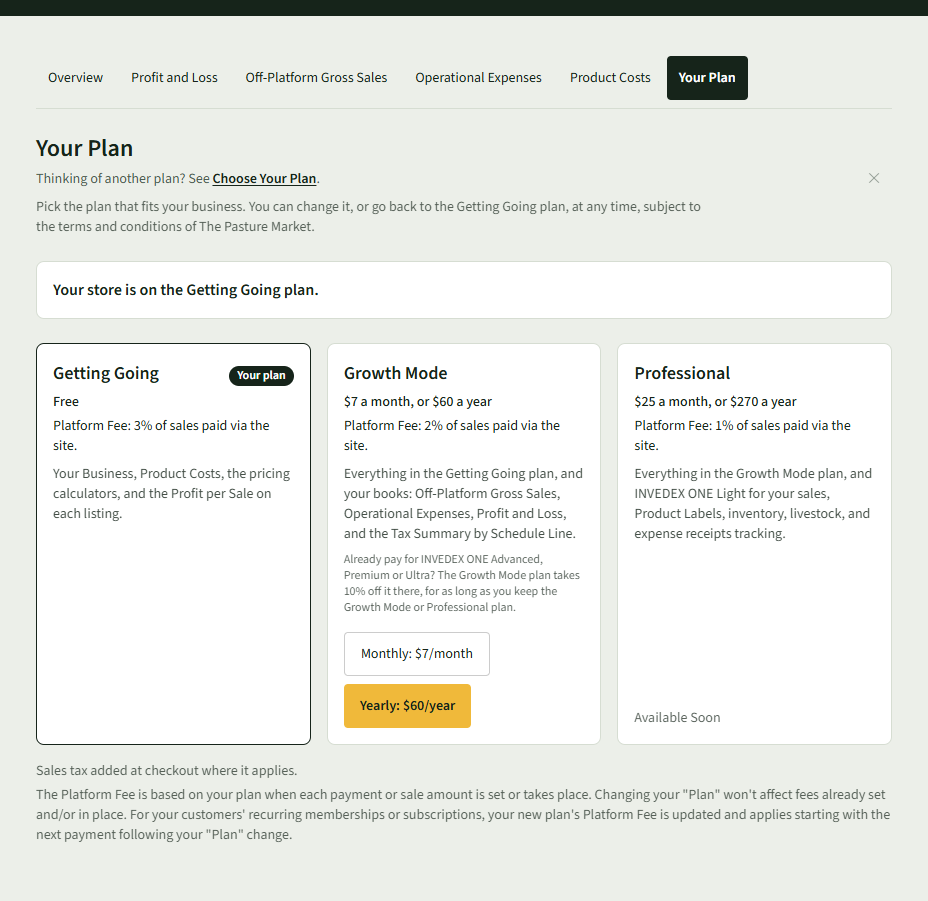
Compare Getting Going, Growth Mode and Professional. The page says which plan your store is on.
- 3
To move to Growth Mode, choose Monthly: $7/month or Yearly: $60/year, and pay on Stripe's page.
- 4
Back on Your Plan, it says: Thank you. Your plan changes may take a moment to process.
- 5
To go back to the free plan, choose Change to the Getting Going plan, then Click here to confirm plan change. You keep your paid plan until your paid time runs out.
Good to Know
None of your data is deleted when you go back to Getting Going.