
← Help · Seller: Business Suite
Read Your Business
Review your store's performance metrics, including sales, deductions, and customer data over a specified period.
- 1
Open Your Store ▾ and choose Your Business.

- 2
Choose Last 30 days, Last 90 days, Current Year or Previous Year. For your own dates, enter From and To and choose Show.

- 3
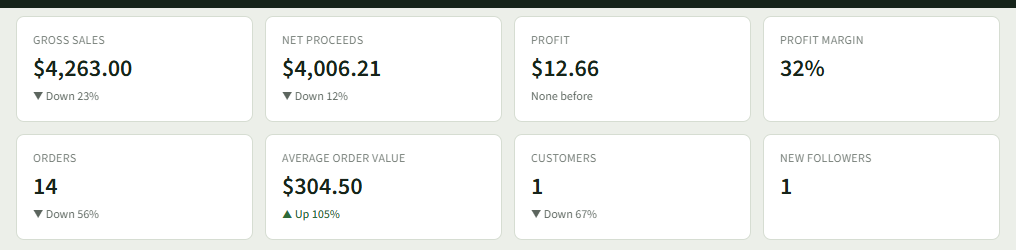
Read the figures at the top: Gross Sales, Net Proceeds, Profit, Profit Margin, Orders, Average Order Value, Customers and New Followers. Each says how it moved against the same length of time before.
- 4
Under Gross Sales to Net Proceeds, see the Platform Fee, Payment Processing Fees and Refunds that came off. Choose See it to open your Off-Platform Gross Sales for the same days.

- 5
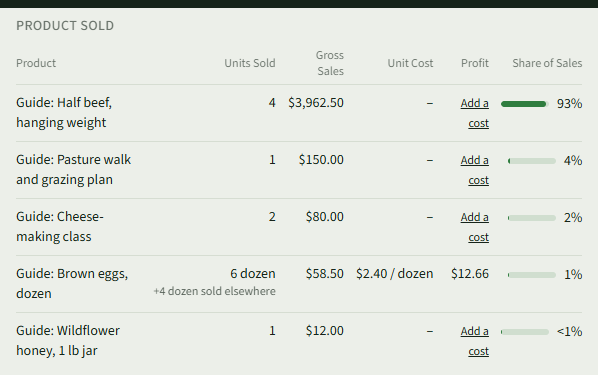
Under Product Sold, see each listing's Units Sold, Gross Sales, Unit Cost, Profit and Share of Sales. Choose Add a cost on a row that has none.
- 6
Further down, see Monthly Gross Sales (choose Show as a table for the figures), Fulfillment Method, Customers and Followers.
Good to Know
Your Business is part of every plan, Getting Going included; Profit shows a dash until your listings have a cost on Product Costs.