
← Help · Seller: Business Suite
Set Your Product Costs and Unit Cost
Enter the unit cost for each listing to calculate your Profit per Sale.
- 1
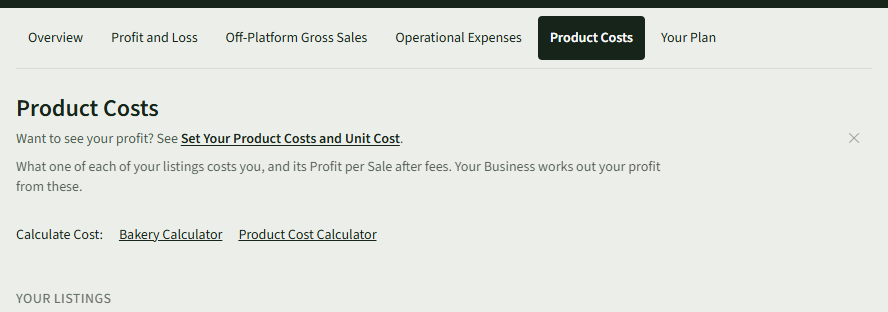
Open Your Store ▾ and choose Product Costs.
- 2
On the listing's row, choose Enter Unit Cost. The listing's edit page opens.
- 3
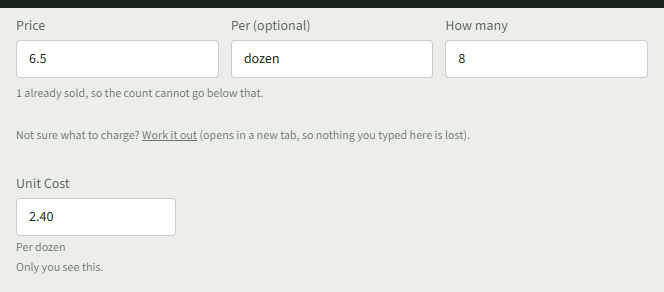
Type what one costs you in Unit Cost, under the price. Only you see it.
- 4
Choose Save changes.
- 5
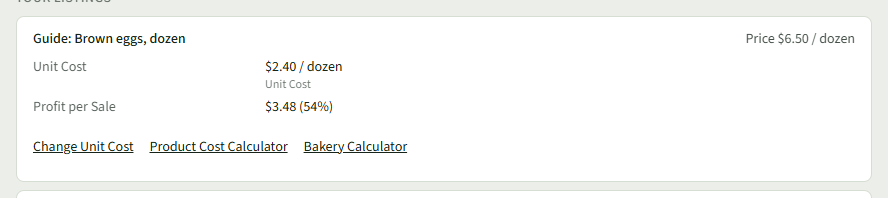
Back on Product Costs, the row shows the Unit Cost and the Profit per Sale, and Change Unit Cost to change it.
- 6
The listing's edit page also shows What it costs you and the profit per sale under Unit Cost, and Your Business shows Profit and Profit Margin.
Good to Know
Product Costs and Profit per Sale are part of every plan, Getting Going included; a costing saved from a pricing calculator is used in place of the Unit Cost.